What is MAKCU?
Learn what the MAKCU hardware does, how it differs from HWMacro software, and what to check before buying.
What is MAKCU?
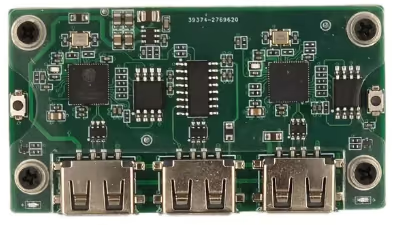
MAKCU is a separate box that connects the gaming PC, mouse, and the phone, tablet, or second Windows PC running HWMacro.
MAKCU and HWMacro are different
- MAKCU is the hardware connected between the devices.
- HWMacro is software that runs on an Android phone or tablet, or a second Windows PC. HWMacro is not installed on the gaming PC.
Where to buy
Search “MAKCU” on AliExpress, Amazon or eBay.
Cables and adapters
Data cable: the box normally ships with 2 USB-A male-to-male data cables, so you rarely need to buy one. If yours are missing, get a cable sold as supporting data transfer. Charge-only cables never work.
OTG adapter (Android phone / tablet only): a USB-C male to USB-A female adapter. Search “USB-C to USB-A OTG adapter” on AliExpress, Amazon or eBay.
Searching “OTG cable” or “dual USB cable” gets you the wrong thing: the first pulls in male-to-male cables, extension cables and reversed USB-to-USB-C adapters; the second pulls in USB-C-to-USB-C cables and charge-only cables.
Back to the main line: Quickstart : wiring, connecting and picking a profile all live there.